
Choosing accounting software is hard. FreshBooks and QuickBooks lead the market. Both help manage finances. But they serve different needs. This guide compares them directly. We use data from expert reviews and user experiences. Find the best fit for your business here.
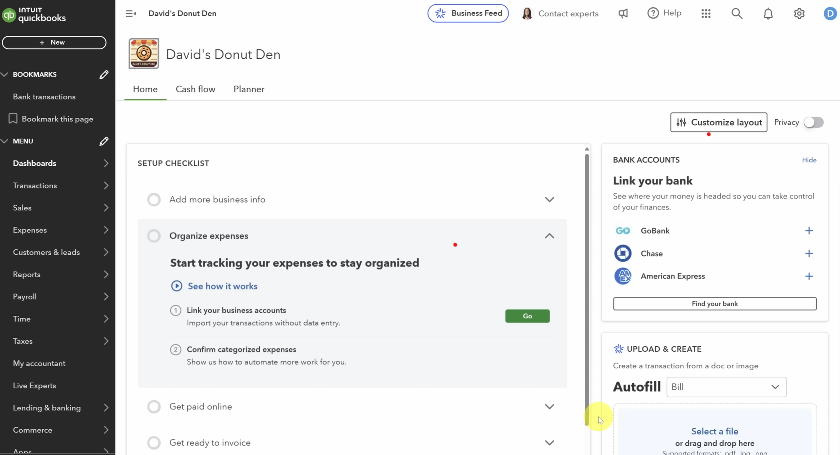
Table of Contents
FreshBooks vs QuickBooks: Head-to-Head Overview
This table shows key differences quickly.
| Feature | FreshBooks | QuickBooks Online |
|---|---|---|
| Best For | Freelancers, service-based small businesses | Small to medium businesses, inventory-based companies |
| Starting Price | $19/month (Lite) | $38/month (Simple Start) |
| User Satisfaction | 99% (FinancesOnline) | 96% (FinancesOnline) |
| Key Strength | Invoicing, time tracking, user experience | Comprehensive features, reporting, inventory management |
| Free Trial | 30 days | 30 days |
| Mobile App | iOS & Android (Highly rated) | iOS & Android (Highly rated) |
Detailed Feature Comparison
1. Pricing and Plans
FreshBooks offers simpler, often cheaper plans. Prices start at $19/month. You can bill only 5 clients on the Lite plan. The Plus plan ($38/month) allows 50 clients. Premium ($65/month) offers unlimited clients. Each extra user costs $11/month.
QuickBooks starts at $38/month (Simple Start). Essentials is $75/month. Plus is $115/month. Advanced is $275/month. These plans include more users. Simple Start has one user. Essentials has three. Plus has five. Advanced supports 25 users. QuickBooks is more expensive. But it offers more value for growing teams.
Winner: Tie. FreshBooks wins for solo users. QuickBooks wins for teams.
2. Invoicing and Payments
Both create professional invoices. FreshBooks excels here. Its interface is intuitive. Invoices are highly customizable. It tracks when clients view invoices. Setting up recurring bills is easy. Payment reminders are automatic. FreshBooks Payments integrates seamlessly.
QuickBooks invoicing is also powerful. It handles partial payments well. The “Pay Now” link speeds up collection. It automatically matches payments to invoices. QuickBooks can calculate sales tax by customer address.
Winner: FreshBooks. It makes invoicing effortless and client-friendly.
3. Expense Tracking and Bill Management
FreshBooks connects to your bank. It imports and categorizes expenses. You can snap receipt photos. The mobile app is great for this. Tracking project expenses is simple.
QuickBooks has stronger bill management. You can record and pay bills online. It supports purchase orders. Vendor credit tracking is built-in. Bank reconciliation starts on the lowest plan. FreshBooks requires the Plus plan for reconciliation.
Winner: QuickBooks. Better for full accounts payable management.
4. Time Tracking
FreshBooks includes time tracking in all plans. Use a built-in timer. Add billable hours directly to invoices. This is perfect for freelancers and consultants.
QuickBooks requires an add-on. Use QuickBooks Time for $20/month. Manual time entry is available in higher plans. The add-on offers advanced features like geofencing.
Winner: FreshBooks. Built-in tracking saves money and hassle.
5. Inventory Management
FreshBooks has basic inventory. You can add items to invoices. The system warns about low stock. But it doesn’t track cost of goods sold (COGS).
QuickBooks has robust inventory tools. Available on Plus and Advanced plans. Track stock levels. Set reorder points. Manage item assemblies. Calculate COGS automatically. It integrates with sales channels like Shopify.
Winner: QuickBooks. Essential for product-based businesses.
6. Reporting and Accounting
FreshBooks provides essential reports. Profit & Loss, balance sheets, expense reports. Reports are clear but lack deep customization.
QuickBooks reporting is superior. It offers over 100 report templates. Customize them extensively. Create classes and locations for detailed tracking. This is vital for business analysis and accountant reviews.
Winner: QuickBooks. Unmatched depth for financial insight.
7. User Experience and Setup
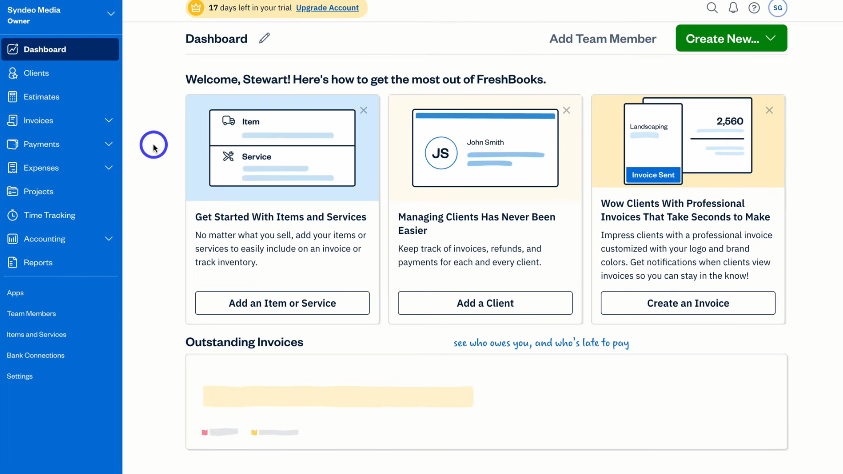
FreshBooks is famously user-friendly. The dashboard is clean and colorful. Navigation is simple. Setup takes minutes. PCMag praised its “cutting-edge user experience.”
QuickBooks has more features. This creates a learning curve. The interface is professional but busier. Setup involves more steps. However, it offers guided setup and phone help.
Winner: FreshBooks. Easier for beginners and non-accountants.
8. Integrations and Scalability
FreshBooks integrates with 100+ apps. Includes Gusto, Stripe, Shopify, and Zapier.
QuickBooks integrates with 750+ apps. Connects to many more business tools. Its ecosystem includes payroll, payments, and point-of-sale. This makes it highly scalable for growth.
Winner: QuickBooks. More connections for a growing business stack.
9. Customer Support
FreshBooks offers phone, email, and chat support. Phone hours are Monday-Friday, 8 a.m. to 7 p.m. ET. The Select plan gets a dedicated number.
QuickBooks provides chat, callback, and community support. 24/7 phone support is for Advanced plan users. Many accountants are QuickBooks experts, providing indirect support.
Winner: FreshBooks. Direct phone access is a major advantage.
Expert Opinion and Final Verdict
Based on testing and reviews, the choice is clear.
Choose FreshBooks if:
You are a freelancer or solopreneur. Your business is service-based. Invoicing and time tracking are your core needs. You value a simple, beautiful interface. You work with fewer than 5 clients or are willing to upgrade as you grow.
Choose QuickBooks Online if:
You run a small or medium business. You sell physical products and need inventory tracking. You require detailed, customizable financial reports. You have multiple team members needing access. You plan to scale and use many integrated apps.
Both are excellent. FreshBooks is the specialist for services. QuickBooks is the powerhouse for broader business needs. Consider your core operations and growth path. Start a free trial for both to feel the difference.
FAQ Section: FreshBooks vs QuickBooks
Is FreshBooks as good as QuickBooks?
Yes, for specific users. FreshBooks is excellent for freelancers and service providers. QuickBooks is better for inventory-based businesses and complex accounting.
What are the downsides of FreshBooks?
Client limits on lower plans. Less advanced reporting. No built-in purchase orders. Inventory tracking is basic.
Can you invite your accountant to FreshBooks?
Yes. The Plus plan and above allow you to invite one accountant for access.
Does QuickBooks have a mobile app?
Yes. QuickBooks has iOS and Android apps. You can invoice, capture receipts, and view reports.
Which is easier to learn, FreshBooks or QuickBooks?
FreshBooks is generally easier to learn. Its design is simpler and more intuitive for beginners.
Are FreshBooks and QuickBooks cloud-based?
Yes. Both are cloud-based software. You access them through a web browser or mobile app. Your data syncs automatically.