
Introduction to QuickBooks Software for Small Business
QuickBooks software for small business simplifies financial management. This accounting tool helps owners track money. It organizes invoices, expenses, and reports. Many small companies choose QuickBooks for its ease. The software saves time and reduces errors. This review explores its key features and plans. We will identify the best fit for your business needs.
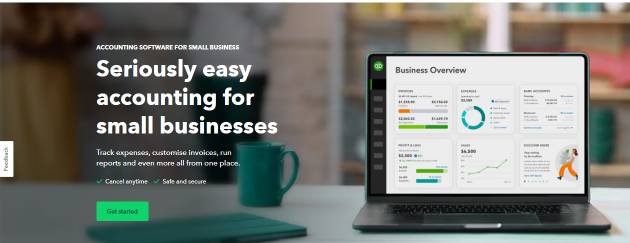
Table of Contents
Understanding QuickBooks Software for Small Business
QuickBooks offers several product versions. Each version serves different business sizes. The right choice depends on your operations. Key factors include user count and industry needs. Accessibility and features are also critical. We will compare all main options below.
QuickBooks Product Comparison Table
| Product | Starting Price | Max Users | Access Type | Best For |
|---|---|---|---|---|
| QuickBooks Online | $35/month | 25 | Cloud | Most small businesses. |
| QuickBooks Solopreneur | $20/month | 1 (+Accountant) | Cloud | Freelancers and contractors. |
| QuickBooks Pro Plus | $549/year | 3 | Desktop (PC) | PC users wanting local software. |
| QuickBooks Premier Plus | $799/year | 5 | Desktop (PC) | Medium businesses with industry needs. |
| QuickBooks Enterprise | $1,410/year | 40 | Desktop (Cloud option) | Larger businesses with complex needs. |
| QuickBooks Mac Plus | $549/year | 3 | Desktop (Mac) | Mac users wanting local software. |
Detailed Review of Key QuickBooks Products
QuickBooks Online
QuickBooks Online is the industry leader. It is cloud-based and accessible anywhere. The interface is user-friendly. Basic accounting knowledge is helpful. Plans scale with your business. Higher tiers offer inventory and job costing. It connects to your bank for automatic feeds. This reduces manual data entry. Real-time reporting supports better decisions.
QuickBooks Solopreneur
This plan is for independent workers. It separates business and personal expenses. Features include basic invoicing and receipt capture. Mileage tracking is also included. It simplifies tax preparation. This is a straightforward, cost-effective option.
QuickBooks Desktop Products (Pro, Premier, Enterprise, Mac)
These are installed directly on your computer. Pro Plus handles core accounting tasks. Premier Plus adds advanced reporting and industry tools. It suits nonprofits, retailers, and wholesalers. Enterprise is the most powerful version. It manages advanced inventory and pricing. Mac Plus is the sole desktop version for Apple computers.
How to Choose the Right QuickBooks Product
Consider these six factors.
- Features: List your must-have accounting tasks. Do you need inventory or job costing?
- Accessibility: Cloud access is vital for remote work. Desktop software stays on one machine.
- Ease of Use: QuickBooks Online has an intuitive design. Desktop versions have more complex menus.
- Scalability: Will your user count or needs grow? Choose a plan that allows expansion.
- Users: Count how many people need access simultaneously.
- Cost: Balance monthly fees against one-time licenses. Remember add-on costs like payroll.
Expert Opinion and Self-Review
In my experience, QuickBooks Online is the best starting point. Its cloud access and automatic updates provide great value. The automation of bank reconciliation saves hours. I find the reporting tools powerful for cash flow analysis. However, very small freelancers might find it excessive. Solopreneur or a simpler alternative could work better. For local, service-based businesses, the Plus plan is often ideal. It manages projects and tracks time effectively. Research confirms that automation in accounting software improves accuracy and efficiency for small firms (Google Scholar). QuickBooks excels in this automation.
QuickBooks Alternatives and Comparisons
QuickBooks does not have a free plan. Consider alternatives if you need one.
- Wave: Offers free accounting and invoicing.
- Xero: Strong competitor with excellent bank reconciliation.
- FreshBooks: Excellent for client-focused invoicing and time tracking.
Compare features before deciding. Look at integration with other tools you use.
Other QuickBooks Business Products
QuickBooks also provides related services.
- QuickBooks Payroll: Integrates seamlessly for paying staff.
- QuickBooks POS: A point-of-sale system for retailers.
- QuickBooks Payments: Processes customer invoice payments.
These integrate with the core accounting software. They create a unified business system.
Implementation Guide for QuickBooks
Follow these steps to start.
- Select Your Plan: Use the table above to decide.
- Set Up Company File: Enter your business name and tax ID.
- Connect Bank Accounts: Link accounts for automatic transaction feeds.
- Customize Chart of Accounts: Tailor categories to your business model.
- Set Up Invoices and Products: Add your logo and service items.
- Invite Your Accountant: Use the secure access for collaboration.
Conclusion
QuickBooks software for small business is a powerful solution. It organizes finances and saves valuable time. QuickBooks Online suits most modern, growing businesses. Desktop versions fit specific, localized needs. Assess your requirements against the product features. Start with a plan that matches your current size. You can always upgrade later. Proper setup is key to maximizing its benefits.
FAQ Section
What is QuickBooks software for small business?
It is accounting software. It manages invoices, expenses, payroll, and reports.
Which QuickBooks version is easiest to use?
QuickBooks Online is generally the most user-friendly. It has a clear, guided interface.
Can I access QuickBooks from my phone?
Yes, QuickBooks Online and Solopreneur have mobile apps. Desktop versions require remote access tools.
Does QuickBooks help with taxes?
Yes. It tracks income and expenses. It generates tax-ready financial reports for your accountant.
How much does QuickBooks cost monthly?
Prices start at $20 per month for Solopreneur. QuickBooks Online starts at $35 per month.
Can I switch QuickBooks plans later?
Yes. You can upgrade or downgrade your online plan easily. Switching from desktop to online requires data migration.
Keywords & Phrases: QuickBooks accounting software, small business bookkeeping, online invoicing software, cloud accounting, expense tracking, financial reporting, payroll management, QuickBooks plans comparison, QuickBooks setup guide.
1 thought on “QuickBooks Software for Small Business: Best Plans in 2026”